SpeQ Mathematics 3.4
Updated on 10 May 2012
By Anthony Buckner
By Anthony Buckner
Specifications
License:
Freeware (Free)
Updated:
Downloads:
1868
Platform:
Windows (All Versions)
Publisher:
SpeQ Mathematics(more)
Website:
User Reviews:
Other versions:
Do you like
SpeQ Mathematics?
SpeQ Mathematics?
FindMySoft Editor's Review
SpeQ Mathematics – Easy to Use and Powerful Calculator
If you are a math student or a teacher who would like to make up some tests for the class, then using pen and paper seems like a bad choice, as it can take a lot of time and effort. A much better idea would be to use computer software for this. There are a lot of programs on the market for performing math operations, but few of them are simple and intuitive to use. SpeQ Mathematics is one of them. This simple Windows application includes almost any math function or formula you can think of, allowing you to easily add them to an equation.
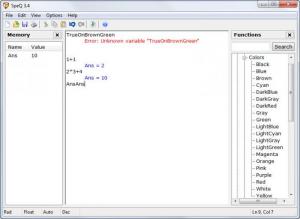
The application is very simple to install and can be used from the minute it is launched, as the interface is highly intuitive. When launching the program, a sample project file will be opened, which includes various equations, allowing the user to get familiar with the program's functionality. One can modify the sample project or he can create a new one from scratch, easily. Doing this can be simple thanks to the large number of variables and functions which are efficiently organized in the right part of the interface.
Having all the formulas and values organized in groups can make it very simple to find any of them fast. More functions and formulas can be combined together, producing the results in less than a second. The user can also type his own equation manually and can press Enter to see the result.
A project file can have an unlimited number of equations. After the user is done with the calculations, he can save the results as a text file or as a project file, for modifying it later on. Besides that, the answers to all the equations included in the project file can be displayed in the left part of the interface, for making them easier to spot.
Pros:
It allows performing any mathematical operation in very little time. Besides that, it includes a large library of mathematical functions. Furthermore, the list of equations can be saved as a project file or as a regular text file.
Cons:
The program requires some mathematical knowledge to be fully used and mastered.
SpeQ Mathematics allows you to perform any math operation in the shortest time possible and with great ease.
The application is very simple to install and can be used from the minute it is launched, as the interface is highly intuitive. When launching the program, a sample project file will be opened, which includes various equations, allowing the user to get familiar with the program's functionality. One can modify the sample project or he can create a new one from scratch, easily. Doing this can be simple thanks to the large number of variables and functions which are efficiently organized in the right part of the interface.
Having all the formulas and values organized in groups can make it very simple to find any of them fast. More functions and formulas can be combined together, producing the results in less than a second. The user can also type his own equation manually and can press Enter to see the result.
A project file can have an unlimited number of equations. After the user is done with the calculations, he can save the results as a text file or as a project file, for modifying it later on. Besides that, the answers to all the equations included in the project file can be displayed in the left part of the interface, for making them easier to spot.
Pros:
It allows performing any mathematical operation in very little time. Besides that, it includes a large library of mathematical functions. Furthermore, the list of equations can be saved as a project file or as a regular text file.
Cons:
The program requires some mathematical knowledge to be fully used and mastered.
SpeQ Mathematics allows you to perform any math operation in the shortest time possible and with great ease.
System Requirements
Microsoft Windows 95, 98, ME, 2000, NT, XP, Vista, or 7
Pentium 166 MHz or better processor
32 MB of RAM
1 MB free disk space
Do you like SpeQ Mathematics
Quick Look VideoNew
Popular News
The free AboutOne app is currently exclusive to Windows Phone. The app is available for free in the Markeplace.
Google rolled out Chrome 19 to the Stable Channel. This version fixes some security problems and adds tab syncing capabilities.
SpeQ Mathematics Awards
SpeQ Mathematics Editor's Review Rating
SpeQ Mathematics has been reviewed by Jerome Johnston on
10 May 2012. Based on the user interface, features and complexity, Findmysoft has rated
SpeQ Mathematics
4
out of 5 stars, naming it ExcellentYour Rating
Top Downloads
2.
Opera5.
Trillian8.
AIM9.
Skype10.
Ad-Aware12.
Nero13.
Google Earth14.
Picasa15.
Winamp16.
iTunes17.
RealPlayer18.
uTorrent19.
eMule20.
WinRAR21.
BitComet22.
WinZip23.
Shareaza24.
CCleaner25.
Recuva26.
Tweak UI27.
CuteFTP Home29.
Adobe Reader30.
NewsPiperBecome A Fan!
Link To Us!
SpeQ Mathematics
HTML Linking Code
HTML Linking Code
Latest Reviews